EcoTank Sublimation Printer Bundle with Ink and Paper, Free Shipping
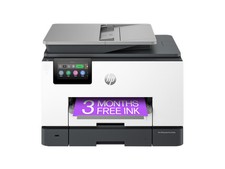
This EcoTank sublimation printer bundle includes the printer, sublimation ink, and paper. The unit is professionally converted and tested specifically for sublimation use; it is not intended for regular printing. The ink tanks are filled with sublimation ink, and the printhead is primed and ready for production. Free shipping is included. Check the listing for details on the exact EcoTank model, included items, and any other condition notes before purchase.


| Item ID | 265836043650 |
| Location | Greensboro US |
| Shipping | Free shipping (check listing for details) |
| Seller |
lorelinx
97.2% positive · 11279 feedback
|
| Listing | FixedPrice · Active |
| Start time | 2022-08-17T20:05:10.000Z |
| Input Type | Color |
| Output Type | Color |
| Custom Bundle | Yes |
| Supported Paper Size | A4 (210 x 297 mm), Legal (216 x 356), Letter (216 x 279) |
| Brand | Epson |
| Type | All-In-One Printer |
| Technology | Dye Sublimation |
| Maximum Resolution | 1200 x 2400 DPI |
| Model | WorkForce SuperTank EcoTank |
| Connectivity | Wireless, USB 1.0/1.1, USB 2.0 |
| Features | Copier, Scanner |
| Black Print Speed | 10 ppm |
| Product Line | Ecotank |
This EcoTank sublimation printer bundle includes the printer, sublimation ink, and paper. The unit is professionally converted and tested specifically for sublimation use; it is not intended for regular printing. The ink tanks are filled with sublimation ink, and the printhead is primed and ready for production. Free shipping is included. Check the listing for details on the exact EcoTank model, included items, and any other condition notes before purchase.
Before you buy
- Ungraded cards can vary—zoom in on photos for surface, corners, and centering.
- If it’s a “pick your card/insert” listing, confirm the exact card name/number in the listing.
- Review shipping rules (combined shipping / envelope vs mailer) on the listing.
About This ItemThis printer is professionally converted and tested for sublimation use. DO NOT BUY it for regular printing.The ink tanks are filled with sublimation ink. The printhead is primed and ready for production.Are these new? So, it is used. How "used" is it?We work on hundreds of printers a year. We only pick the best of them all: printers that has total pages less than 150. Other printers will be sold as regular printers. Therefore, if you don't mind minor wear and tear and just want a workhorse, this lightly used printer is for you.How to read the test pages in the package?You will see two test pages: 1) Nozzle Check Page. It will show an excellent nozzle check with all colors (KCMY), and also the total page as we packing up the printer. You can also get this page by going to your printer's control panel->Setting->Maintenance->Nozzle Check. We just want to show that we have a perfect printer leaving our facility.2)There will be another page says "scanner check". We just put a small card on the scanner and color-copied it. The pages shows the scanner works. Because the printer is in sublimation ink, it won't print real color, so the
color will look a little bit off and the image will not be in the highest resolution. The whole purpose is to show the scanner/copier works, not to impress you with the image.Who are you?I've been doing this for 11 years. I have a YouTube channel (30,000+ subscribers, look up Kevin at BCH) that teaches people to do sublimation, DTF, and printer repair. Here are few videos you may find helpful. I used the same printer model (as this listing) in the first video, so you can see how it works.What's in the box?1x Epson Printer (filled with sublimation ink). If there are ink bottles in the picture, the ink will be prefilled into the printer. There will be no ink bottles in the package.1 x Pack (10 pages) of sublimation paper. The white side is the side that you print on. Leave the paper dry for at least 5 minutes before pressing.1 x Power Cord.Where is the ink?The ink will be prefilled into the printer. There will be no ink bottles in the package.How big can it print?The maximum width is 8.5" and the maximum length is 47.2"PC-free Paper Support Plain (letter, 8.5" x 14", A4), Photo(4" x 6", 5" x 7", 8" x 10", letter, A4)Max. Paper Size 8.5" x 47.2"Paper Sizes 3.5" x 5", 4" x 6", 5" x 7", 8" x 10", 8.5" x 11",8.5" x 14", A4, A6, half letter, legal, executivePaper Types Plain Paper, Epson Bright White Paper, PhotoPaper Glossy, Premium Photo Paper Glossy, PresentationPaper Matte, Premium Presentation Paper Matte and PremiumPresentation Paper Matte Double-sidedOther Tips?You will need a heat press to start experimenting. Try hot (385 to 400 F) and short (25-30 seconds) for soft material like vinyl, polyester. Use low (355-375 F) and long (90-100 seconds) for hard surfaces like aluminum plates or cups.All live materials, such as cotton, wood,... need to be coated. Aluminum needs to be coated, and ceramics need to be coated. If you are not sure, buy things with the word "sublimation blanks" in the title.How to start & get colors right (from my YouTube channel: Kevin's Ink & More)Video One: I used exact same printer model as this listing. Must-Known Tips for Sublimation Beginners - from Printer Conversion to Color Correction Video will open in a new window Using the mobile app? Copy this link into your browser: .ft_vid p .ft_vid .ft_vid .ft_vid img .ft_vid a:after .ft_vid a:hover:after .ft_lnk_div .ft_lnk 7 Tips for Sublimation Success - Part 1: Ink, Monitor, Printer, and Paper Video will open in a new window Using the mobile app? Copy this link into your browser: .ft_vid p .ft_vid .ft_vid .ft_vid img .ft_vid a:after .ft_vid a:hover:after .ft_lnk_div .ft_lnk Part 2 7 Tips for Sublimation Success - Part 2: Time, Temperature and Color Management ICC Profile Video will open in a new window Using the mobile app? Copy this link into your browser: .ft_vid p .ft_vid .ft_vid .ft_vid img .ft_vid a:after .ft_vid a:hover:after .ft_lnk_div .ft_lnk